Many sales teams build their proposal process around Proposify, but it might not be the right fit for every team, whether that’s due to pricing or feature limitations
Users have flagged consistent limitations worth considering before committing to the platform.
Such as:
- A difficult editing experience: The editor frustrates users who expect flexibility. As one G2 reviewer put it, the process feels unintuitive and slows down proposal creation rather than speeding it up. Teams under deadline pressure feel this most acutely.
- Limited customization: Proposify constrains what advanced formatting, photo integration, and audio elements are possible. For sales teams that want proposals to reflect their brand at a high level, that ceiling becomes a real problem fast.
- Missing advanced features: Users expecting a full-featured proposal platform report friction around customization depth and proposal delivery. When a tool promises to handle enterprise-level complexity and falls short, the workarounds pile up.
Here are the top Proposify alternatives worth evaluating:
Overview of Proposify alternatives
| Proposify Alternative | Standout Feature | Starting Price (USD)* | G2 Rating |
|---|---|---|---|
Qwilr | Block-level buyer engagement analytics and built-in payment collection via QwilrPay | $35 per user/month | 4.6/5 |
PandaDoc | Two-way CRM sync with CPQ, deal rooms, and payment collection in one platform | $19/user/month | 4.7/5 |
GetAccept | Digital sales rooms with mutual action plans and CRM-native proposal creation | $25/user/month | 4.7/5 |
Docusign | Compliance-grade e-signature including QES, notarization, and automated approval routing | $63/user/month | 4.5/5 |
Conga Composer | Automated document generation from any CRM, ERP, or system of record at scale | Custom pricing | 4.4/5 |
Better Proposals | Automatic Designer with post-signature client onboarding built into the workflow | $19/user/month | 4.3/5 |
Responsive | TRACE Score AI accuracy validation for RFP and questionnaire responses | Custom pricing | 4.6 |
Loopio | Response Intelligence AI with SME recommendations and portal-based RFP handling | $20,000/year | 4.7/5 |
*Starting price as of March 2026
1. Qwilr
Founded in: 2014
G2 rating: 4.6/5
Best for: Sales teams that want interactive, branded proposals with built-in e-signature, payments, and CRM automation in a single platform.
Overview
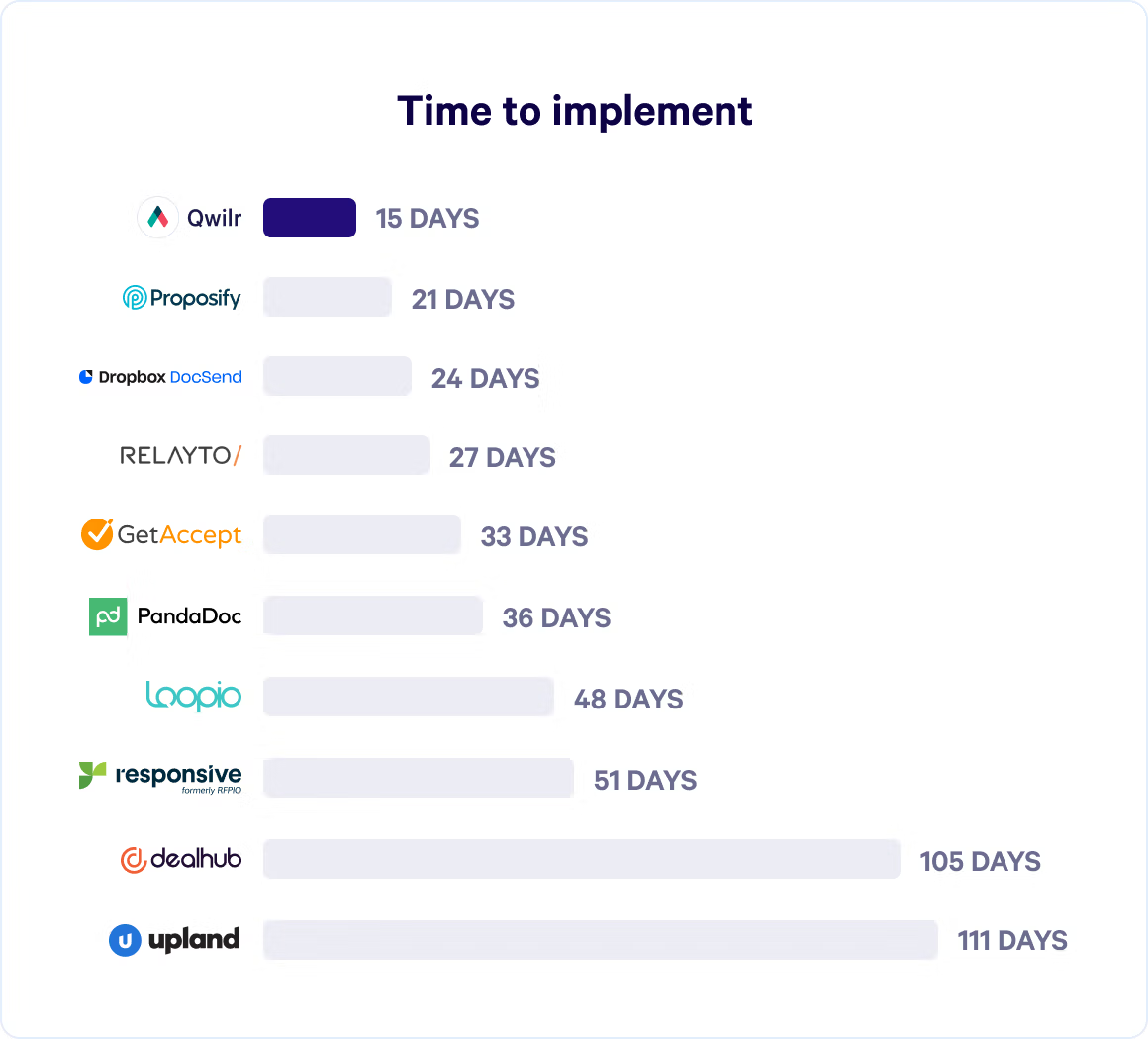
Qwilr is a proposal management platform built specifically for sales teams that want to create interactive, web-based proposals that buyers can engage with, sign, and pay for in a single session.

It's the most direct Proposify alternative on this list, covering the same core use case with a stronger emphasis on buyer experience, payment collection, and CRM-driven automation. For agencies seeking a platform that handles the full workflow from branded proposals through to accepted payment, Qwilr covers all of it without additional tools.
The decision between Qwilr and Proposify comes down to a few specific capabilities: interactive pricing that buyers can configure themselves, built-in payment collection via QwilrPay, and block-level engagement analytics that track behavior within individual proposal sections rather than just opens and time spent.
Why Qwilr stands out
Qwilr's engagement analytics go deeper than most proposal tools. Beyond tracking opens and time on page, reps can see which individual content blocks buyers interacted with, whether they adjusted pricing, and whether they stalled mid-signature. Sales teams get the specific behavioral signals needed to time follow-ups precisely.
QwilrPay is the other significant differentiator. Buyers can review pricing, sign, and collect payments in a single document through credit card, direct debit, and bank transfer — making it one of the few proposal tools to fully replace a separate payment tool. CRM automation also runs deeper than Proposify's integration layer — Qwilr pulls deal data from Salesforce, HubSpot, Pipedrive, and Zoho to generate personalized proposals automatically, and pushes updates back, moving deals to closed, updating amounts and close dates, and triggering downstream workflows.
Key features
- Interactive, web-based proposals with video, dynamic pricing, ROI calculators, and calendar links — making them genuinely engaging proposals that buyers explore rather than read passively
- Block-level buyer engagement analytics and proposal analytics track interactions within individual proposal sections
- QwilrPay — built-in payment collection and ability to accept payments via credit card, direct debit, and bank transfer
- Recurring payment and subscription billing are configured within the proposal
- Legally binding electronic signatures — including collecting electronic signatures with full audit trail and multi-signer support
- Plain-text agreement sections for contracts and terms within the same proposal page
- CRM-driven proposal creation with dynamic personalization from deal data
- Customizable proposal templates with an asset library of reusable, approved content blocks for team-wide standardization
- Automated CRM updates triggered by proposal events — signing, payment, acceptance
- Identity verification for tracking unnamed stakeholders who view proposals
- Password protection, link expiry, and view limits for sensitive content
- SOC 2 Type 2 compliant with PCI-DSS compliant payment processing
Integrations
- CRM: HubSpot, Salesforce, Pipedrive, Zoho CRM
- Accounting: QuickBooks
- Productivity: Slack (real-time proposal notifications)
- Platform: API for connecting custom data sources and triggering automated workflows
What others say about Qwilr
“It’s easy to integrate with HubSpot, and it brings our sales process, customer experience, and HubSpot workflows together in one place. Our team also loves it because it helps us present ourselves more professionally to customers, while reinforcing our brand representation and tone of voice. Our customers and technical partners have commented on how engaging it is, and a few have even asked for more information about Qwilr because they’re considering using it for their own businesses. The ease of implementation was fantastic, the onboarding, training, and designing from Qwilr went really well. The ease of use for the team, customer, and myself has also been praised. Customer support, you cannot fault them. Their replies are super quick, and is almost always fixed in good time"
Eleanor W, Photographer
“I've used Qwilr for around 1.5 years now, on a daily basis, and I always had good experiences with the platform. It's very user-friendly and intuitive. It provides very professional and clean proposals to clients. Today I had the need to use the support channel for the first time, and was really impressed with the speed and quality of the support received, super fast and helpful.”
Pedro R., Customer Success Manager
Pricing
- Business: $35/user/month — editor, e-sign, QwilrPay, pricing and quotes, page analytics, HubSpot, Pipedrive, and Zoho CRM
- Enterprise: $59/user/month (10-user minimum, billed annually) — Salesforce CRM, advanced automation, SSO, role-based permissions, and advanced analytics
A free trial is available.
| Pros | Cons |
|---|---|
Block-level engagement analytics are more granular than Proposify's tracking | Salesforce integration and advanced automation require the Enterprise plan |
Built-in payment collection removes the need for a separate payment tool | 10-user minimum on Enterprise may not suit smaller teams |
CRM automation pushes and pulls data without manual entry | Narrower integration library than PandaDoc or Docusign |
Proposify vs. Qwilr
Where Proposify wins:
- Larger integration library, including more CRM and project management connections
- Longer track record with a larger G2 review base
Where Qwilr wins:
- Block-level buyer engagement analytics and proposal analytics that track behavior within individual proposal sections
- Built-in payment collection to accept payments and support recurring billing without a separate tool
- Deeper CRM automation that generates proposals and triggers deal updates automatically
- Interactive pricing that buyers can configure themselves within the proposal
- Branded proposals with a consistent professional look across every document the team sends
Bottom line: Both platforms cover the same core proposal creation use case. Qwilr pulls ahead for sales teams that want payment collection, granular buyer analytics, and CRM-driven automation built into the proposal workflow.
2. PandaDoc
Founded in: 2013
G2 rating: 4.7/5
Best for: Automating document workflows across the full sales cycle
Overview
PandaDoc is a document creation and automation platform that helps sales teams create, send, track, and close sales documents without bouncing between tools.
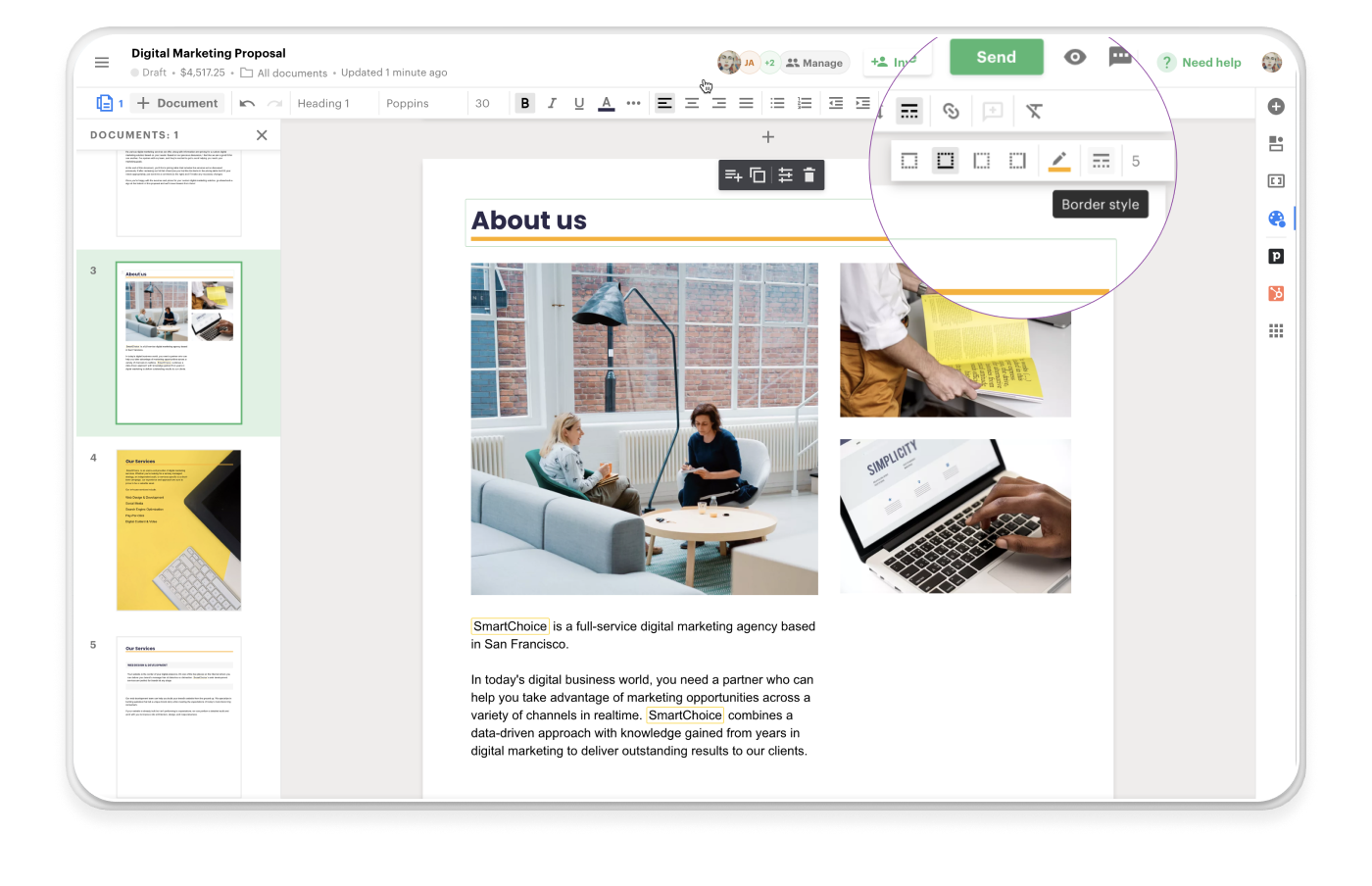
Sales teams use it as a Proposify alternative when they need more than proposal creation, specifically when quoting, contract management, and payment collection need to live in the same workflow. For larger sales teams managing complex document workflows across multiple business documents, PandaDoc's breadth makes it a strong fit.
The two-way CRM sync means customer data flows in from Salesforce or HubSpot automatically, and completed quote data passes back to the CRM record without manual entry — something Proposify's integration layer doesn't replicate at the same depth.
Why PandaDoc stands out
PandaDoc's CPQ functionality is a meaningful differentiator for teams managing complex pricing. Reps can build product bundles, apply dynamic pricing rules, and trigger approval workflows based on discount thresholds.
The deal room feature gives buyers a centralized workspace to review documents, ask questions, and sign — one of the more capable client collaboration tools in this category. This keeps the entire buying experience in one place rather than scattered across email threads, improving client engagement throughout the sales process.
Key features
- Drag and drop document editor with live preview
- CPQ with automated product configuration, pricing rules, and guided selling
- Two-way CRM sync with Salesforce, HubSpot, Pipedrive, and others for seamless integrations with existing sales tools
- Conditional content and smart variables for personalization at scale — enabling data-driven proposals without manual customization
- Built-in approval workflows with conditional routing based on deal size or discount level
- PandaDoc Rooms to manage proposals and create a shared buyer-seller workspace for collaborative deal management
- Document analytics showing page-level engagement, open times, and signing activity
- Native e-signature with audit trails and digital certificates
- AI-assisted content drafting and document refinement
- Batch document generation for high-volume use cases
- Customizable templates across proposal and contract types
Integrations
- CRM: HubSpot, Salesforce, Pipedrive, Zoho CRM, Microsoft Dynamics, Copper, ActiveCampaign, Zendesk Sell, Monday.com, and more
- Payment: Stripe, PayPal, QuickBooks Online, Square, FreshBooks, Authorize.Net
- Storage: Google Drive, Dropbox, OneDrive, Box, SharePoint
- Productivity: Slack, Microsoft Teams, Gmail, Outlook, Zoom
- Other: Zapier, Canva, Greenhouse, Airtable, Asana, ClickUp, Shopify, WooCommerce
What others say about PandaDoc
"I like how easy it is to create, send, or track documents with PandaDoc. The interface is good, and the templates save us time. It's easy for users from different departments to learn quickly, and templates help us standardize documents instead of creating them from scratch."
Kyle B., Network Administrator, G2
“On the downside, I find the formatting options a bit limited for complex layouts, and some advanced features can get pricey. Customer support is generally good, but it can be inconsistent at times. Overall, it’s a great tool for streamlining document workflows, even if customization could be better.”
Theresa P., Sr. Research Regulatory Coordinator
Pricing
- Starter: $19/user/month
- Business: $49/user/month
- Enterprise: Contact sales for pricing
- Free eSign plan available with limited features
A 14-day free trial is available with no credit card required.
| Pros | Cons |
|---|---|
Full document lifecycle — from sending sales proposals through to payment — in one platform | Advanced CPQ and automation are locked to higher-tier plans |
Wider integration library than Proposify across CRM, payment, and accounting software | Can feel oversized for teams whose only need is proposal creation |
Built-in deal rooms for post-proposal client engagement and collaboration | Formatting flexibility is reported as occasionally inconsistent |
Proposify vs. PandaDoc
Where Proposify wins:
- Proposal-focused design tools with stronger visual formatting control
- Simpler interface for teams that don't need CPQ or contract management
Where PandaDoc wins:
- Extends beyond proposals into quoting, contracts, and payment collection
- Two-way CRM sync and a broader integration library across the sales stack
Bottom line: Proposify suits sales teams focused on proposal creation and tracking. PandaDoc is the better fit for organizations that need a single platform to handle the full deal cycle, including other sales documents, contracts, and payment collection.
Read next: PandaDoc Alternatives
3. GetAccept
Founded in: 2017
G2 rating: 4.6/5
Best for: Digital sales rooms, buyer engagement analytics, and contract management for revenue teams running complex, multi-stakeholder deals
Overview
GetAccept is a digital sales room platform that doubles as a capable proposal tool, giving sales teams a single environment to create, send, track, and manage proposals.
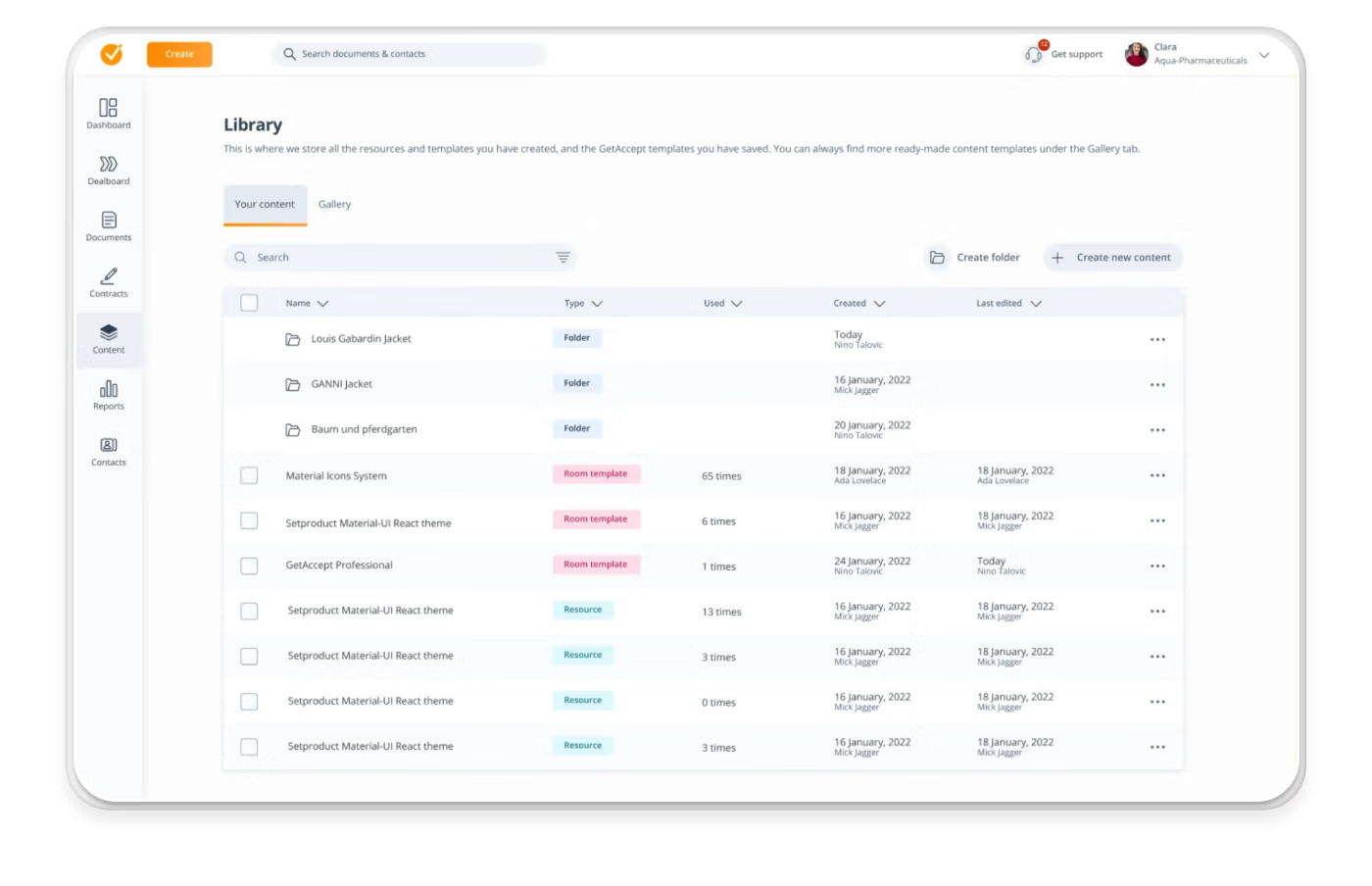
Teams moving away from Proposify consider it when they need richer buyer engagement data and more collaborative deal management alongside their proposal workflow. For larger sales teams running complex, multi-stakeholder deals, GetAccept's mutual action plans and digital sales rooms extend the platform's value well past the proposal stage.
The platform's proposal features are purpose-built for sales: mobile-responsive templates, CRM-driven personalization, CPQ pricing, and real-time engagement analytics that track buyer behavior.
Why GetAccept stands out
GetAccept lets reps send proposals directly from their CRM by auto-populating templates with deal data, adding personalized video introductions, and embedding live chat. That reduces the manual steps between discovery and delivery, and cuts the time reps spend on proposal creation.
On the buyer side, engagement analytics track time spent on individual pages, unique stakeholder views, and pricing interactions. These analytics give reps a clearer picture of where interest is concentrated and when to follow up.
Key features
- Mobile-responsive, professional-looking proposals with drag and drop editing
- CRM-driven proposal creation with auto-populated deal data and dynamic personalization
- Video introductions, live chat, and video blocks embedded directly in proposals — making them more engaging proposals than static documents
- CPQ pricing tables ensure accurate, up-to-date interactive pricing across the team
- Real-time buyer engagement analytics and document analytics — page-level time, unique views, and stakeholder mapping
- Approval workflows with configurable roles to streamline internal sign-off
- Mutual action plans for collaborative post-proposal deal management and project progress tracking
- Three-tier e-signature: simple, advanced, and qualified electronic signature (QES) — covering legally binding electronic signatures across different compliance requirements
- Contract management with folders, tags, and renewal reminders
- AI-powered content editor, business case builder, and meeting summarizer
Integrations
- CRM: HubSpot, Pipedrive, Salesforce, Upsales, LimeGo, Microsoft Dynamics
- Productivity: Slack, Microsoft Teams, Gmail, Outlook
- Other: Zapier, and 500+ tools via automation connections
What others say about GetAccept
"GetAccept has been a great tool for streamlining our document process. It’s easy to set up and update templates, which saves a lot of time, and I really like the additional features it offers compared to traditional e-sign platforms. The ability to monitor when and how customers are viewing documents gives valuable insight and helps us stay more engaged throughout the process. Overall, it’s user-friendly and highly effective."
Joshuah B., Account Manager
"The design options are a bit limited, though there are workarounds. It would also be helpful to have more detailed analytics per business user—like the number of rooms created, how engaging they are, and which content is most appreciated by prospects and clients."
Verified user in online media
Pricing
- eSign: $25/user/month — e-signature, templates, basic editor, engagement video
- Professional: $49/user/month (minimum 5 users) — full digital sales room, GetAccept AI, CPQ, advanced analytics, HubSpot, and Pipedrive integrations
- Enterprise: Contact sales for pricing
A free trial is available.
| Pros | Cons |
|---|---|
Digital sales rooms built for multi-stakeholder deal management | CRM integrations are limited to HubSpot and Pipedrive on the Professional plan |
Mutual action plans give pipeline visibility beyond proposal status | Minimum 5-user requirement on Professional may not suit smaller teams |
AI content tools run entirely within GetAccept's infrastructure | Feature depth may exceed what simpler proposal-only workflows require |
Proposify vs. GetAccept
Where Proposify wins:
- Stronger visual design flexibility for brand-forward proposal creation
- Lower entry point for smaller teams without a minimum user requirement
Where GetAccept wins:
- Proposal creation flows directly from the CRM with auto-populated personalization
- Page-level engagement analytics and stakeholder mapping go beyond what Proposify tracks
- Mutual action plans and digital sales rooms extend the platform's value past the proposal stage
Bottom line: Proposify works well for sales teams focused on proposal creation and basic engagement tracking. GetAccept is the stronger fit for revenue teams running longer, committee-driven deal cycles where stakeholder visibility and collaborative deal management matter as much as the proposal itself. It’s a strong Proposify alternative for enterprise plan users who need more than a basic proposal tool.
4. Docusign
Founded in: 2003
G2 rating: 4.5/5
Best for: Legally compliant e-signature and agreement workflows for organizations where procurement, legal, and finance are active stakeholders in every deal.
Overview
Docusign enters the conversation as a Proposify alternative for organizations where the bottleneck is what happens after the proposal is accepted. Legally binding electronic signatures, procurement approval, and multi-party contract workflows require more robust infrastructure than most proposal software provides.

Legal review, procurement approval, regulated signing requirements, and multi-party contract workflows are where Proposify's capabilities end, and Docusign's begin.
The platform's relevance to proposal teams is specific: it's not a proposal design tool, but for heavily regulated industries or enterprise procurement environments where a signed proposal is just the start of a longer approval chain, Docusign's infrastructure handles what comes next more robustly than most dedicated proposal tools.
Why Docusign stands out
Docusign's Agreement Preparation tool generates accurate, compliant agreements at speed once a deal moves past the proposal stage. Templates connect directly to live data sources, agreements auto-populate with the right information, and conditional rules flag non-standard terms before they reach a reviewer.
On the e-signature side, Docusign goes considerably further than what proposal tools offer natively. Qualified Electronic Signature (QES), multi-factor authentication, timestamped audit trails, and remote online notarization cover regulated industries and international deals that simpler e-signature implementations can't support.
Key features
- Document creation with dynamic templates and conditional content rules — covering other business documents beyond proposals
- No-code workflow builder for automated approval workflows and signing sequences
- Multi-channel signature delivery via email, WhatsApp, and SMS
- Qualified Electronic Signature (QES) and the ability to collect electronic signatures for regulated and high-compliance use cases
- Audit trails with timestamped activity, IP logging, and tamper-evident certificates
- Remote online notarization with 24/7 access to a qualified notary pool
- AI-assisted clause review and language suggestions
- Centralized document repository with search and renewal tracking — helping teams track proposals and other sales documents post-signature
Integrations
- CRM and sales: Salesforce, HubSpot, Microsoft Dynamics
- Productivity and storage: Google Workspace, Microsoft OneDrive, Box, SharePoint
- Workflow automation: Microsoft Power Automate, ServiceNow, Workday, Monday.com
- Identity verification: CLEAR
- API access for custom integrations and embedded signing workflows
What others say about Docusign
“What I like best about Docusign is how effortless it makes the entire document signing process, from start to finish. Implementation is very straightforward and doesn’t require much technical effort, so teams can start using it quickly without long onboarding or setup time. We use it very frequently for contracts, approvals, and official documentation, and it consistently works without issues.”
Ankit P., Solution Architect
"What I dislike about Docusign is that while it’s excellent for basic signing, some of the more advanced features can feel a bit complicated to set up, especially when creating templates or customizing workflows. I’ve noticed that the interface occasionally feels a little clunky when formatting fields, and the mobile app isn’t always as seamless as the desktop experience."
Hetal P., IT Analyst
Pricing
- IAM Starter: £50/user/month — 10 envelopes/month, AI search and analysis, 1 automated workflow
- IAM Standard: £60/user/month (3-user minimum) — unlimited envelopes, 3 automated workflows
- IAM Professional: £75/user/month (3-user minimum) — unlimited envelopes, 10 automated workflows, web forms
- Enterprise: Contact sales for pricing
| Pros | Cons |
|---|---|
Compliance-grade e-signature, including QES and notarization | Limited proposal design flexibility compared to Proposify |
Automated approval routing built for procurement-heavy deal cycles | Feature depth and pricing may exceed what sales-focused teams need |
1,000+ integrations across enterprise systems | Buyer engagement analytics are minimal compared to dedicated proposal tools |
Proposify vs. Docusign
Where Proposify wins:
- Purpose-built proposal design with stronger visual customization
- Buyer engagement analytics showing section-level reading behavior
- Simpler setup and lower cost for sales-led teams
Where Docusign wins:
- Compliance-grade e-signature for regulated industries and international deals
- Automated approval workflows built for legal and procurement review cycles
- Enterprise integration depth for organizations running complex internal approval processes
Bottom line: Proposify suits sales teams that need polished proposals, engagement tracking, and straightforward e-signature. Docusign is the stronger fit where legal compliance, procurement routing, and regulated signing standards are non-negotiable. It’s a specialized Proposify alternative rather than a direct replacement for proposal creation.
Read next: 9 Docusign Alternatives to Streamline Signing
5. Conga Composer
Founded in: 2006
G2 rating: 4.4/5
Best for: High-volume, data-driven document generation for enterprise revenue teams running complex CPQ and CLM workflows
Overview
Conga Composer sits at the infrastructure end of the document creation spectrum — built for organizations that need proposals, contracts, and quotes produced automatically from existing data systems at scale.
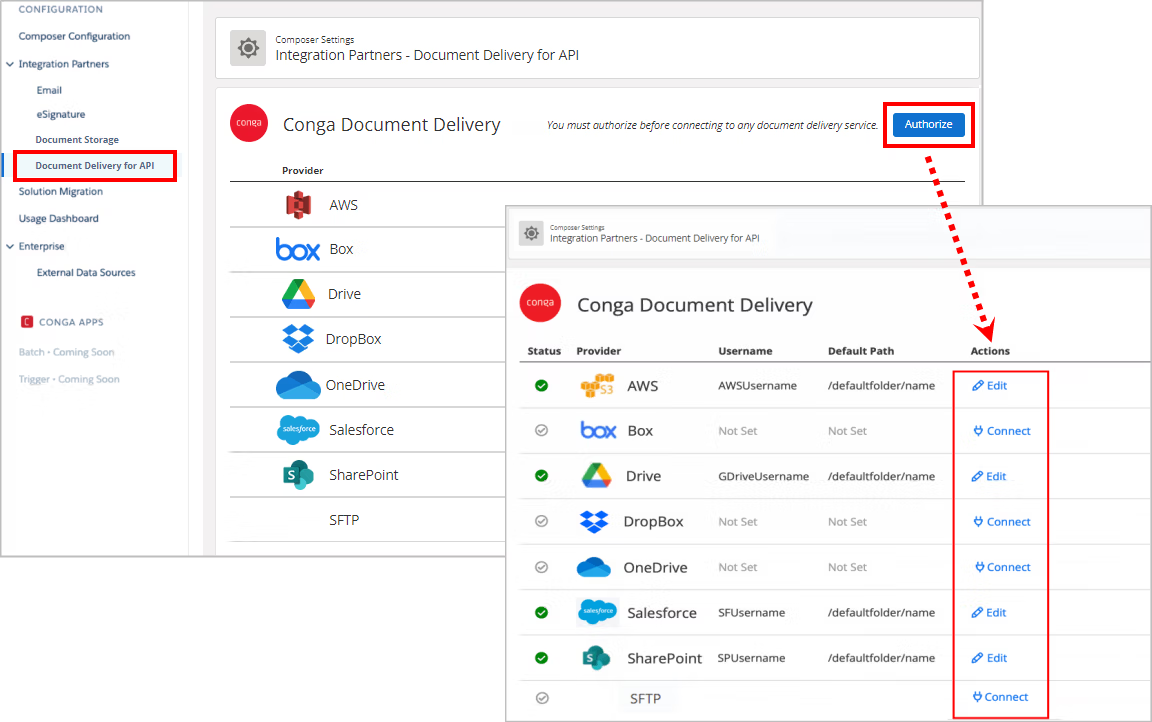
Its API-first architecture pulls data from any CRM, ERP, or system of record and merges it into consistent, branded proposals and business documents at scale. For businesses creating high document volumes across complex revenue workflows, Conga sits naturally within enterprise stacks that already use Conga's CPQ and CLM products.
Why Conga Composer stands out
Data from multiple sources merges into a single document automatically, removing the manual consolidation that creates errors in high-volume proposal and contract environments.
The platform integrates directly with Conga CPQ and Conga CLM, meaning teams already in the Conga ecosystem can run the full document lifecycle without switching platforms. Conga Sign handles the e-signature side with compliance coverage spanning ESIGN, UETA, eIDAS, GDPR, and HIPAA, and certification against ISO/IEC 27001, SOC 2 Type II, and FedRAMP — a more defensible infrastructure than Proposify provides for regulated industries or global teams.
Key features
- Automated document creation from any CRM, ERP, or data source — enabling businesses to create consistent, branded proposals and sales documents without manual entry
- Multi-format output, including Word, PDF, Excel, and PowerPoint
- Conditional content display and complex data grouping within customizable templates
- Bulk document generation with time and action-based triggers — suited to larger sales teams managing high document volumes
- Pre-built template library covering proposals, quotes, statements of work, and contracts
- Conga Sign with ESIGN, UETA, eIDAS, GDPR, and HIPAA compliance for legally binding electronic signatures
- Multiple signature types: simple, advanced, and qualified electronic signature (SES, AES, QES)
- Tamper-proof audit trail permanently embedded within signed documents
- Multi-factor signer authentication, including email, SMS, and ID verification
- Native integration with Conga CPQ and Conga CLM for end-to-end revenue lifecycle management
- API-first architecture for embedding into custom portals and bespoke systems — offering seamless integrations with existing enterprise infrastructure
Integrations
- CRM: Salesforce, HubSpot, Microsoft Dynamics 365, SugarCRM
- ERP: SAP, Oracle Fusion Applications, Infor, Epicor, Workday, SYSPRO
- Procurement and pricing: Coupa, PriceFx
- Storage: Box
- Platform: API-first architecture supports connection to any system of record or custom portal
What others say about Conga Composer
“What I like most about Conga Composer is how it removes the manual work from creating documents. Instead of copying information from Salesforce into Word files, everything is pulled automatically and placed into a predefined layout and it is easy to setup and is being used by business for daily purposes of document generation. This makes proposals and other customer documents more consistent and much easier to produce.”
Pasula K., Consultant
"When a document fails to generate or data doesn't merge as expected, the error messages aren't always descriptive. Troubleshooting involves a lot of trial and error rather than receiving clear, actionable feedback. Also, the initial setup wasn't that easy. Basic usage is straightforward, but some configurations require a high level of understanding about the product, which took time for our team to learn and set up from the beginning."
Elena G., Business Admin
Pricing
Custom pricing — contact Conga sales for a quote.
| Pros | Cons |
|---|---|
Pulls and merges data from any CRM, ERP, or system of record | No transparent pricing — custom quotes required |
Handles complex formatting, conditional content, and bulk generation at scale | Buyer engagement analytics and interactive pricing are absent from the core feature set |
Compliance-grade e-signature covering global regulatory standards | Less suited to teams whose primary need is proposal design and buyer engagement |
Proposify vs. Conga Composer
Where Proposify wins:
- Purpose-built proposal design with interactive pricing, engagement analytics, and buyer tracking
- Faster setup for sales teams that don't need enterprise-grade document infrastructure
- Transparent pricing with a clear free trial path
Where Conga Composer wins:
- Automated document generation from multiple data sources with no manual entry
- Bulk document handling and action-based triggers for high-volume revenue operations
- Compliance-grade e-signature and audit trail for regulated industries and global teams
Bottom line: Proposify suits sales teams that need polished, trackable proposals with minimal setup. Conga Composer is built for enterprise revenue operations teams that need document creation to run automatically from existing data systems. It’s a Proposify alternative for organizations where proposal volume and data complexity exceed what standard proposal software handles.
6. Better Proposals
Founded in: 2015
G2 rating: 4.3/5
Best for: Small to mid-sized businesses that want professional, branded proposals without design skills or complex setup
Overview
Better Proposals is a web-based proposal tool built around simplicity and speed. For small businesses and service teams that find Proposify's editor demanding or want a cleaner setup process, Better Proposals removes most of the friction from getting professional proposals out the door.
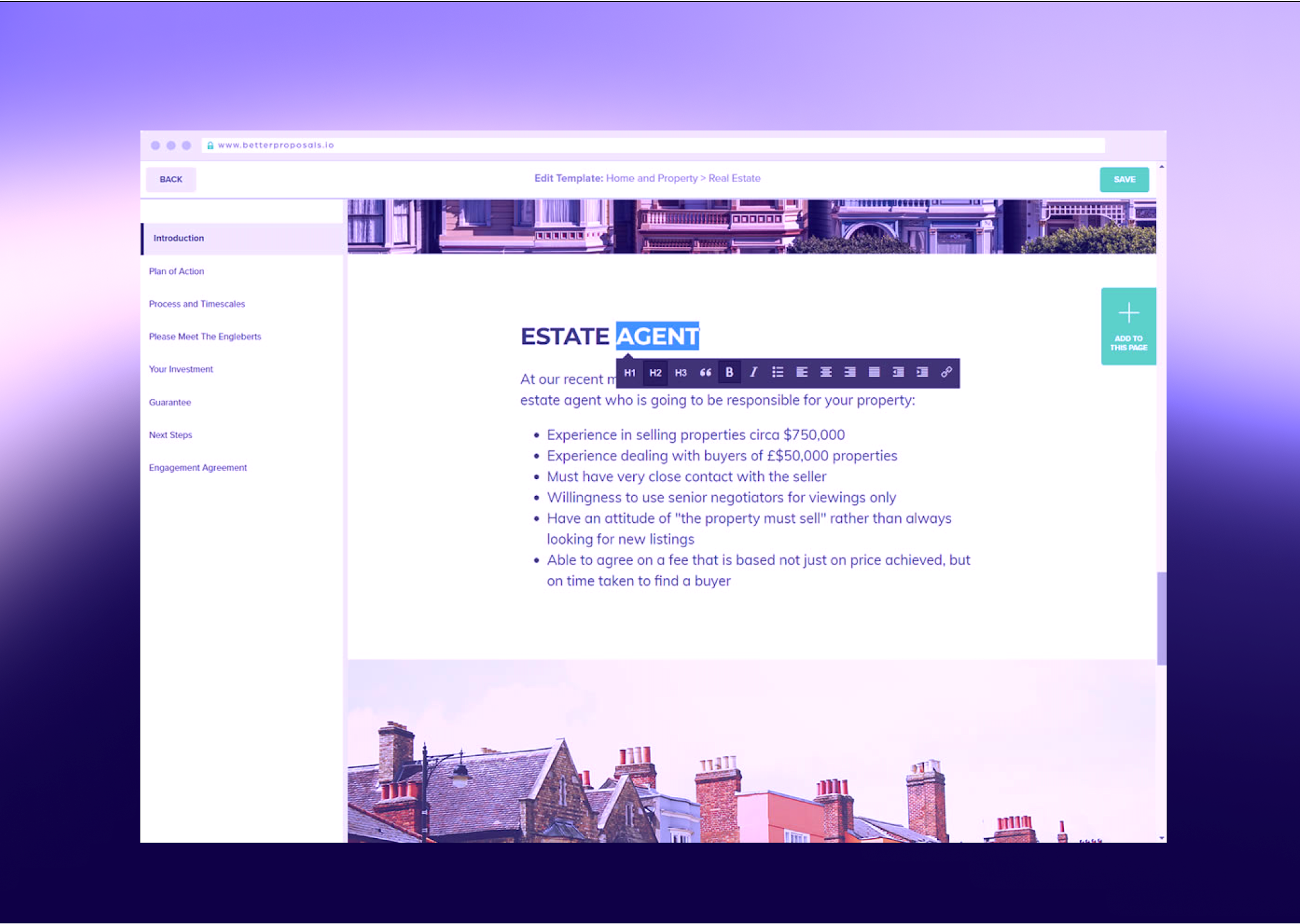
The platform covers proposals, digital signatures, interactive pricing, and a post-signature client onboarding flow. It’s a practical Proposify alternative for agencies seeking to handle the entire pre-project process in one place.
Why Better Proposals stands out
The Automatic Designer is the platform's most distinctive feature. Rather than giving teams full design control — which creates formatting inconsistencies as headcount grows — Better Proposals enforces structure automatically. Content goes in, design comes out. That constraint works in favor of teams where proposal quality varies across reps.
The built-in client onboarding flow is also worth noting for agencies seeking to collect payments and onboard clients without switching tools. Once a client signs, they move directly into a configurable sequence that collects forms, accepts payments via Stripe, PayPal, or GoCardless, and books a kick-off call through Calendly.
Key features
- Automatic Designer that handles formatting, spacing, and branding to produce professional-looking proposals without manual input
- Interactive pricing tables with discounts, quantities, packages, and payment options — including the ability to accept payments directly post-signature
- Content library for reusable sections, case studies, and terms — keeping branded proposals consistent across the team
- Video embedding within proposals for more engaging proposals
- Legally binding digital signatures — collect electronic signatures with IP address, timestamp, and location logging
- Post-signature client engagement flow with forms, payments, call booking, and redirects
- Proposal analytics showing section-by-section engagement and read order to track proposals after sending
- Nudge — a semi-automated follow-up system with configurable campaign sequences
- Team management with content locking, permissions, and manager approvals
- Live document editing — updates are visible to the client without resending
What others say about Better Proposals
“It's such an easy system to use. It's great value for money and has completely changed the game for my business. It's easily integrated with other software, so has allowed me to automate a lot more than I could before. Highly recommended. It was so easy to create beautiful templates and start using right away!”
Rebeka S., Founder
If anything I would like to see more integrations with other software especially CRMs. I'd also like to see an easier way to change between themes and also editing the setup.
Jackie L., Digital Marketing Specialist
Integrations
- CRM: Highrise, Pipedrive, Capsule, Zoho, Insightly, Nimble, Salesforce, HubSpot, Base, Agile, Copper
- Payment: Stripe, PayPal, GoCardless
- Project management: Basecamp, Trello, Asana
- Live chat: Drift, Intercom, Olark, Livechat, Tawk
- Call booking: Calendly
- Automation: Zapier (for connections beyond native integrations)
Pricing
- Starter: $19/user/month — signatures, interactive pricing, content library, analytics
- Premium: $29/user/month — custom domain, CRM integrations, API/Zapier, onboarding flows
- Enterprise: $49/user/month — content locking, simultaneous editing, manager approvals, advanced permissions
| Pros | Cons |
|---|---|
Automatic Designer produces visually appealing proposals and removes formatting inconsistencies across the team | Less design flexibility than Proposify for teams that want full visual control over branded proposals |
Post-signature onboarding flow to collect payments, forms, and call booking in one sequence | G2 rating lower than comparable platforms in this category |
Simpler setup and lower learning curve than most Proposify alternatives | Advanced features and CRM integrations require at least the paid plans at the Premium tier |
Proposify vs. Better Proposals
Where Proposify wins:
- Greater design flexibility and visual customization for brand-forward proposals
- Higher G2 rating with a larger review base
- More robust CRM integrations are available at lower plan tiers
Where Better Proposals wins:
- Automatic Designer enforces consistent formatting without relying on rep discipline
- Post-signature onboarding handles payment collection, forms, and call booking in one flow
- Lower entry price with a cleaner setup process for smaller teams
Bottom line: Proposify suits teams that want full control over proposal creation and a well-established integration ecosystem. Better Proposals is the stronger fit for small businesses and service agencies seeking consistency and speed, and that want the proposal, digital signatures, and client onboarding handled in a single, structured workflow. It's the most accessible Proposify alternative for teams that don't need enterprise plan depth.
7. Responsive (formerly RFPIO)
Founded in: 2015
G2 rating: 4.5/5
Best for: Enterprise revenue and procurement teams managing high-volume Request for Proposal (RFP) responses, security questionnaires, and due diligence requests
Overview
Responsive is a Strategic Response Management platform built for organizations that spend significant time responding to structured information requests such as RFPs, DDQs, and security questionnaires.

For sales teams fielding multiple RFPs simultaneously, the bottleneck is coordinating subject matter experts, maintaining response accuracy, and meeting submission deadlines. That's the workflow Responsive is designed around, making it a niche but highly effective Proposify alternative for enterprise plan users in procurement-heavy industries.
It also covers the procurement side of the equation: teams can issue their own RFPs, score vendor responses, and manage vendor selection.
Why Responsive stands out
Responsive's AI assistant generates first-draft responses by drawing from a library of pre-authored answers, then scores each output using its TRACE Score. For compliance-sensitive submissions, that automated quality layer reduces manual review overhead without sacrificing accuracy.
The requirements analysis capability helps teams make faster bid/no-bid decisions. Responsive condenses lengthy RFP documentation into structured summaries, extracts key requirements into sortable tables, and maps sections to the relevant internal teams.
Key features
- AI-generated response drafts drawn from pre-authored content libraries — producing data-driven proposals and responses at speed
- TRACE Score — automated accuracy, relevance, and traceability scoring for AI-generated responses
- Patented import technology for Word, Excel, and PDF-based questionnaires
- Requirements Analysis with AI-powered document summarization and fit assessment for faster bid/no-bid decisions
- SME assignment with smart recommendations and sequenced review workflows for complex, multi-contributor submissions
- Multi-language response translation is built into the platform
- Request Projects for issuing RFPs, scoring vendor responses, and managing proposal management workflows on the procurement side
- Customizable scorecards with weighted or unweighted criteria for vendor evaluation
- Automatic recall of previously submitted answers for recurring questionnaire types
- Brand-compliant export templates matching original request formats
Integrations
- CRM: Salesforce, HubSpot, Pipedrive, Microsoft Dynamics 365, PipelineDeals
- Productivity: Microsoft Word, Google Sheets
- Cloud storage: OneDrive, Dropbox
- Communication: Slack, Microsoft Teams, Google Hangouts
- Sales enablement: Highspot
- Vendor assessment: Whistic, Door
- LLM connectors: ChatGPT, Microsoft Copilot
- Browser extensions: Google Chrome, Chromium Edge
- SSO: Microsoft ADFS
What others say about Responsive
“The Q&A pair structure is extremely intuitive and makes it easy to organize and reuse content across proposals. The search functionality is especially strong - it’s fast, accurate, and significantly more efficient than traditional tools like SharePoint when trying to locate specific answers or past write-ups. Overall, it streamlines content discovery and helps teams respond more quickly and consistently. When we implemented the tool, we nearly doubled the number of RFI responses our team could handle.”
Greg P., Director Proposal Management
“Can get a bit hard to manage as it grows. At LRN, we have a lot of content across different solutions, and sometimes it takes extra time to find the most relevant or up-to-date answer, especially when multiple versions exist.”
Roberto G., RFP Manager
Pricing
Custom pricing — contact Responsive sales for a quote.
| Pros | Cons |
|---|---|
Purpose-built for RFP and questionnaire workflows that fall outside Proposify's scope | No transparent pricing — custom quotes required |
TRACE Score provides automated quality checks on AI-generated responses | Not designed for outbound proposal creation or buyer engagement tracking |
Covers both sides of the RFP process — issuing and responding | Interactive design and buyer engagement features are absent |
Proposify vs. Responsive
Where Proposify wins:
- Built for outbound proposal creation with interactive design and buyer engagement tracking
- Transparent pricing with a clear trial path
- Better suited to sales teams creating proposals rather than responding to structured requests
Where Responsive wins:
- Handles incoming RFPs, security questionnaires, and DDQs that sit outside Proposify's scope
- AI-powered accuracy scoring for compliance-sensitive submissions
- Covers vendor selection workflows for procurement teams issuing their own RFPs
Bottom line: Proposify suits sales teams creating and sending outbound proposals. Responsive is best for organizations where a significant share of revenue runs through formal procurement processes. Responsive is also a specialized alternative rather than a general proposal tool replacement.
8. Loopio
Founded in: 2014
G2 rating: 4.6/5
Best for: Centralized RFP response management for mid-market and enterprise teams coordinating across multiple subject matter experts and business units
Overview
Loopio is an RFP response management platform built for proposal and bid teams that need to coordinate complex, multi-contributor submissions under tight deadlines.
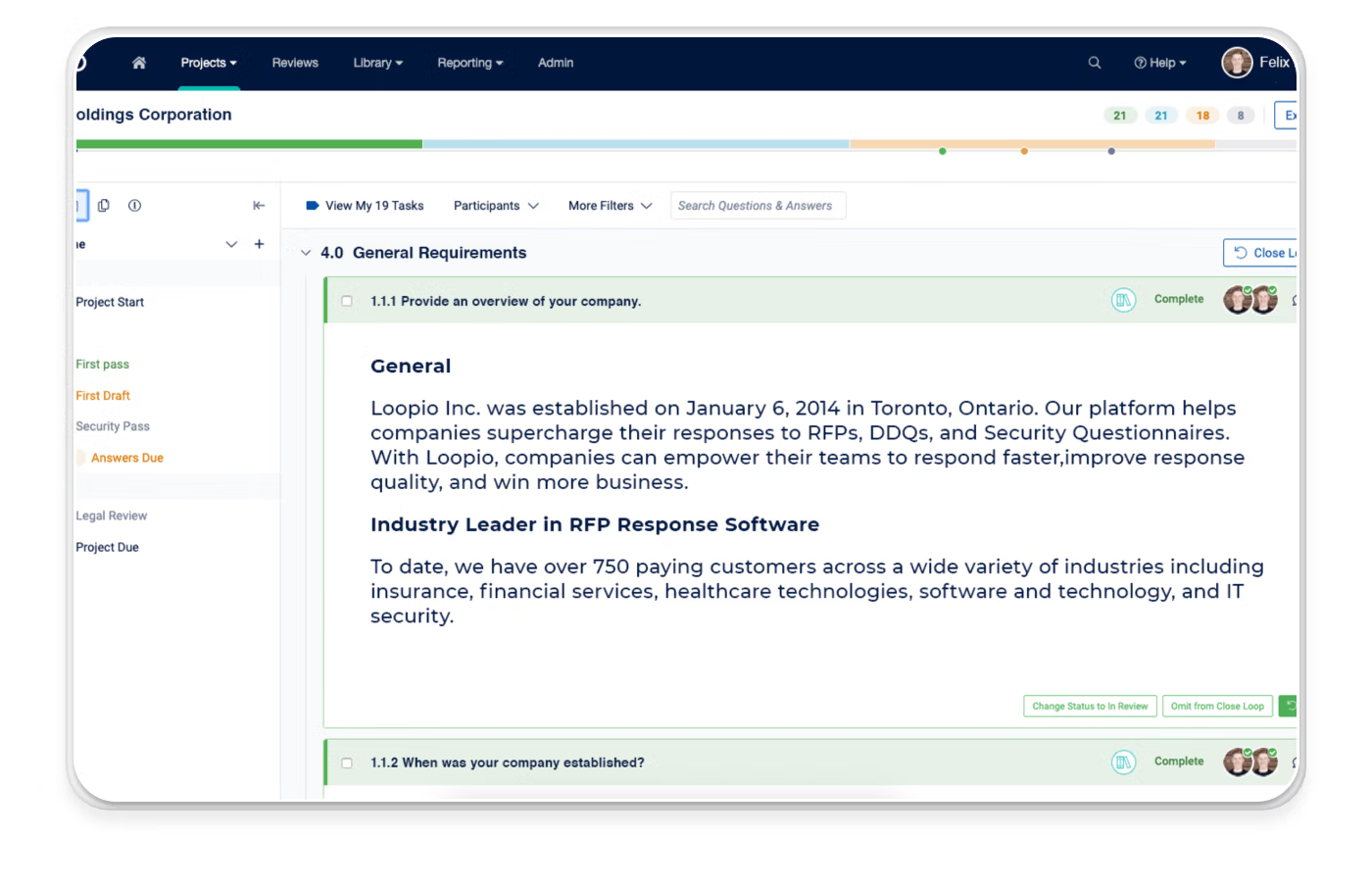
Like Responsive, it enters the Proposify conversation for a specific reason: organizations where meaningful new business comes through formal procurement requests need different infrastructure than what standard proposal software provides. For larger sales teams and enterprise proposal teams managing response volume and content governance at scale, Loopio is a purpose-built Proposify alternative.
Where Responsive leans into requirements analysis and procurement-side RFP issuance, Loopio's differentiator is its content library management, SME coordination workflow, and the depth of its Response Intelligence AI — built on over a decade of response data.
Why Loopio stands out
Loopio's Response Intelligence powers the full response workflow — from automatically populating first drafts using vetted library content, to recommending the right SME for each question based on past contributions, to scoring response confidence across accuracy, trust, and completeness. For bid teams managing hundreds of questions across simultaneous projects, that layer of automation reduces the manual coordination that typically consumes proposal team bandwidth.
The content library sits at the center of the platform. Automated review cycles keep answers current, a Freshness Score flags content that needs updating, and custom categories and tags make it easy for contributors to find and reuse the right content without hunting through shared drives.
Key features
- AI-powered response drafting with zero-hallucination content sourcing from vetted libraries — producing accurate, approved proposals and responses without manual consolidation
- Response Intelligence — SME recommendations, confidence scoring, and win theme identification to improve proposal performance over time
- SmartScan and SmartFill for portal-based RFP import and export
- Automated content review cycles with Freshness Score for content library health monitoring
- Multi-step review workflows with role-based permissions and granular access controls — covering approval workflows for compliance-sensitive submissions
- Confidence Pulse — per-answer accuracy, trust, and completeness indicators
- Project management with milestone tracking, workload visibility, and project progress monitoring
- Business Units for managing permissions and collaboration across departments and geographies
- Reporting dashboards covering win rates, submission speed, and team workload — functioning as lightweight proposal analytics for bid teams
- Microsoft Copilot integration for accessing vetted Loopio content in Word, PowerPoint, and Teams
Integrations
- CRM: Salesforce, HubSpot, Microsoft Dynamics 365
- Productivity: Microsoft Word, Microsoft Teams, Microsoft Copilot, Google Drive
- Communication: Slack
- Cloud storage: SharePoint, Google Drive
- Sales enablement: Highspot, Seismic
- Content sources: Unleash connector pulling from 80+ sources
- SSO: Google SSO, Microsoft Azure
- Under 20 native integrations total
What others say about Loopio
“The biggest upside to Loopio is the library. Our library is in the final stages of being built out, and categories and tags have already saved us a significant amount of time, allowing us to find content without having to dig through completed RFP files.”
Amanda K., RFP Writer
“Main issue will be the initial few weeks or months when you're building the library- the time Loopio needs to learn and understand the type of products and queries thrown at it. I’ve also found that the search functionality can sometimes return too many loosely related answers, which means I still spend time verifying and cleaning up content. If you're too specific, you might not find the answer and if you're too vague answer might be of a different product/service.”
Vijay R., RFP Manager
Pricing
- Foundations: From $20,000/year — unlimited projects, unlimited library entries, generative AI, 10 customizable themes
- Enhanced: Contact sales — multi-language library, confidential projects, multi-step reviews, 15 customizable themes
- Enterprise: Contact sales — global multi-team support, advanced controls
| Pros | Cons |
|---|---|
Response Intelligence AI reduces manual drafting time and improves proposal performance by surfacing winning content patterns | Entry price of $20,000/year puts it beyond reach for small businesses and smaller sales teams |
Content library with automated review cycles and freshness scoring keeps responses accurate and approved proposals current | Native integration library is limited compared to other Proposify alternatives in this category |
Portal-based RFP handling removes manual copy-paste from buyer procurement systems | Not designed for outbound proposal creation, interactive pricing, or client engagement tracking |
Proposify vs. Loopio
Where Proposify wins:
- Built for outbound proposal creation with interactive design and buyer engagement tracking
- Transparent, accessible pricing for teams of any size
- Faster setup for sales teams creating proposals rather than responding to structured requests
Where Loopio wins:
- Purpose-built for RFP response workflows with AI-powered drafting, SME coordination, and content governance
- Response Intelligence surfaces winning content patterns and flags at-risk answers before submission
- Portal-based RFP handling and multi-step review workflows for complex, compliance-sensitive submissions
Bottom line: Proposify suits sales teams creating and sending outbound proposals. Loopio is the best alternative for proposal teams whose work centers on responding to formal procurement requests. Content governance, SME coordination, and response accuracy matter more here than proposal design or buyer engagement features.
How to choose the best Proposify alternative
Choosing a Proposify alternative comes down to where the friction lives in your sales process. For teams whose bottleneck is proposal creation and buyer engagement, the right tool looks different from the one needed for organizations managing RFP response volume, enterprise contract workflows, or high-stakes procurement cycles.
For sales teams that want interactive, branded proposals with built-in payment collection, granular buyer analytics, and CRM-driven automation, Qwilr covers the full workflow without additional tools. Drag-and-drop editing, ready-to-use templates, legally binding e-signatures, and integrations with HubSpot, Salesforce, Pipedrive, and Zoho mean proposals go out faster and close more reliably.
A 14-day free trial gives full access to the platform — no credit card required.
About the author

Kiran Shahid|Content Marketing Strategist
Kiran is a content marketing strategist with over nine years of experience creating research-driven content for B2B SaaS companies like HubSpot, Sprout Social, and Zapier. Her expertise in SEO, in-depth research, and data analysis allow her to create thought leadership for topics like AI, sales, productivity, content marketing, and ecommerce. When not writing, you can find her trying new foods and booking her next travel adventure."